You didn't pick the order of the last twenty things you read. An ad-funded ranking model did, tuned for the seconds you'd linger rather than for whether the thing was worth your time. RSS takes that back. You list the sites and creators you actually want, a reader checks them for new posts, and you read what's new in the order it was published. No recommendations, no autoplay, nothing nagging you to come back. Setting up a feed of ten to twenty-five sources takes about twenty minutes, and after that your reading just shows up, chronological, with nobody in the middle deciding what you see first.
People keep declaring RSS dead because Google killed Google Reader in 2013, and for a while that felt like the funeral. The protocol never stopped working. The companies with ad businesses stopped wanting you to use it. Facebook and Twitter quietly dropped RSS support, because a chronological feed you control is a feed they can't slip ads or 'suggested for you' posts into. It got deprioritized, not deleted.
What a feed actually is
A feed is a plain file a website publishes listing its latest posts: title, link, date, usually a snippet or the full text. It updates whenever the site posts something new. A reader is a program that checks a pile of those files on a schedule and stacks the new items together for you. The site publishes, the reader collects, you read. No algorithm sits between any of those steps.
It's worth bothering with in 2026 because the alternatives got worse. Search results are buried under SEO-spammed filler written to rank rather than to inform. Social timelines reorder themselves around engagement. Meanwhile a lot of good writing lives on independent blogs that rank poorly, never went viral, and have no reason to show up anywhere you'd stumble onto them. RSS is how you reach that surviving indie web on purpose. Some people have followed the same blogs through a reader for fifteen years, straight through every platform that came and went.
Finding feeds for sites you already read
Most readers will find the feed for you if you paste in the homepage URL and hit add. Try that first; it works more often than not. When it doesn't, the fastest manual trick is to type the site's address and stick /feed on the end. On WordPress sites this almost always works, so justinpot.com/feed lands you straight on the feed. If /feed comes up empty, try /rss. Older blogs sometimes hide the link behind the orange RSS icon in the header or footer.
When none of that works, view the page source (right-click, View Page Source) and search the text for 'rss' or 'atom'. The feed URL is almost always sitting in a link tag in the page's head, even when nothing visible points to it. Copy that URL into your reader and you're done.
A few platforms have their own patterns worth knowing. On YouTube, paste a channel's URL straight into your reader and it'll usually resolve the feed, so you follow a creator's uploads with no subscriptions and no recommended sidebar; you can also export every channel you're subscribed to as an OPML file from youtube.com/subscription_manager and import the whole lot at once. On Medium, use medium.com/feed/ followed by the publication name, or add /feed to a Medium blog on a custom domain. For newsletters, a bridge like Kill the Newsletter gives you a throwaway email address that turns whatever lands in it into a feed, so the newsletter shows up in your reader instead of cluttering your inbox. And Google Alerts will deliver a keyword alert as RSS rather than email, which turns brand or topic monitoring into another feed instead of more mail.
Be honest about what's gone. X and Twitter killed public RSS years ago, and most of Instagram is closed off too. You'll find third-party generators that scrape a chronological feed back out, but they break often and I wouldn't build a daily habit on one. If a site you love has no feed and no decent generator, just bookmark it and check it by hand rather than fight a flaky workaround. Watch for feeds that hand you a one-line summary instead of the full post, or that paginate and cut off after the ten most recent items. Both are common now. They still work, you just click through to the site more than you'd like.
Or skip the hunt and start from a list
Everything above assumes you already know whose feed you want. Discovery is the harder problem: finding good sources in a subject you're new to, where pasting homepage URLs one at a time gets you nowhere because you don't know the homepages yet. A curated starting list solves the part the manual tricks can't.
Linkamatic's RSS widget opens to one instead of an empty URL box. The feeds are sorted into 23 topics, from Science and Investing to Cooking, Photography, History, Gardening, and Science Fiction, each with a hand-picked set you add in a click. Open Science and it offers Quanta Magazine, Scientific American, Phys.org, Nature, and NASA. Cooking pulls Budget Bytes, Smitten Kitchen, King Arthur Baking, and The Kitchn. Photography hands you PetaPixel, DPReview, and Fstoppers. You pick from a shelf instead of staring at a search box.
The real value is discovery, not the half-minute of copy-paste it saves. Most people can rattle off two sites in a field they care about and blank on the next eight, and the next eight are where a reader pays off. A vetted list per topic is what turns 'the same two blogs again' into the ones you've been missing.
Three buckets, not eight
Every guide tells you to organize feeds into folders, then shows a taxonomy with eight or nine categories: Must-Read Daily, Industry News, AI and Machine Learning, Product Management, Personal Interests, on and on. Don't copy that. Over-foldering recreates exactly the overload it's supposed to fix; you end up maintaining a filing system instead of reading.
Start with three buckets. Daily Must-Reads is the handful of sources you'd genuinely miss if you skipped a day. Your Field is the trade and topic stuff you skim to stay current. For Fun is the blogs, comics, and YouTube channels you read when you have a minute. That's enough structure to keep the must-reads from drowning in the firehose, which is the only thing folders are good for. Split further later, once a bucket gets unwieldy, but most people never need to.
Over-foldering recreates exactly the overload it's supposed to fix.
Where your feed actually lives
Here's the question every roundup skips. Feedly caps the free tier at 100 sources, Inoreader at 150, NewsBlur at 64, and each nudges you toward eight or ten dollars a month for AI summaries and filter rules. Fine if you're running hundreds of feeds. But if you're a normal person with fifteen, the cap isn't the friction. The reader being a separate app you have to remember to open is. A news feed you go looking for stops being a habit within a week.
So put it where your eyes already land: your browser's start page. If your feed sits on the page that opens every time you launch the browser or hit new-tab, you read it without deciding to. That's the whole game.
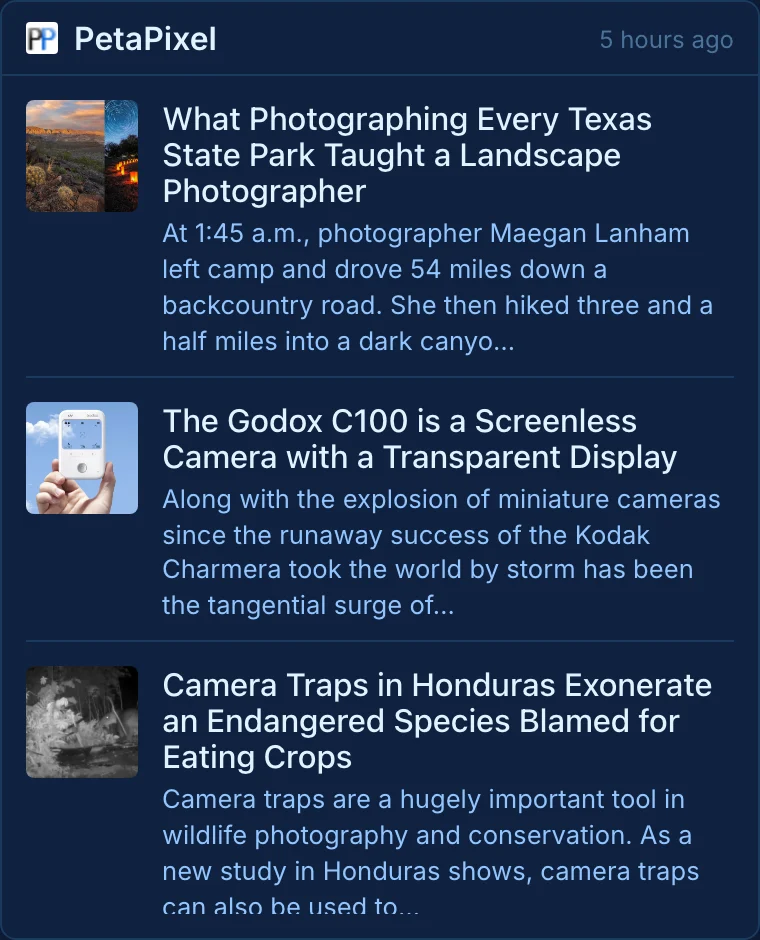
Linkamatic fits this one cleanly. It's a free tool for building your own start page out of links and small widgets on a drag-and-drop grid, and one of those widgets is an RSS reader. You drop the widget onto your page, paste in the feed URLs you collected, and it shows the latest headlines from your sources, in order, no ads, no algorithm, right next to your clock and your weather and your own links. The three-bucket idea maps onto the grid: one RSS panel for Daily Must-Reads, one for your field, one for fun, laid out side by side instead of hidden in a folder tree. Set the page as your browser's home and new-tab and your feed greets you on every launch.
Keeping it readable
Feeds rot. Blogs go quiet, sites kill their feeds, and you subscribe to things in a burst of enthusiasm you never act on. Left alone, a feed list grows until opening it feels like a chore, which is the point where most people quit RSS and blame the format.
The fix is a number, not a discipline. Count how many sources you actually open in a typical week. That's your real list. Cap Daily Must-Reads at a size you can finish in one sitting, maybe ten to fifteen items, so reaching the bottom is possible and 'done' is a real state. Everything else goes in the lower-priority buckets where you scan headlines, open the keepers in tabs, and bulk mark the rest as read without guilt. Fifteen to thirty minutes a day is plenty, and you don't owe every item your attention.
Once a quarter, spend ten minutes pruning. Unsubscribe from anything that hasn't posted in months or that you keep marking read without opening. Cut a feed and miss it, you'll notice, and adding it back takes five seconds. Trimming a bloated list is the single thing that keeps RSS pleasant over years instead of months.
None of this locks you in, either. Your subscription list lives as an OPML file, a plain export every reader supports. Outgrow a tool, want to test three at once, or just don't like the one you picked, and you export the OPML, import it somewhere else, and your whole list moves intact. The list is yours, not the app's. Worth remembering before you pay anyone a monthly fee. Your sources, your order, portable, with nobody ranking them but you.