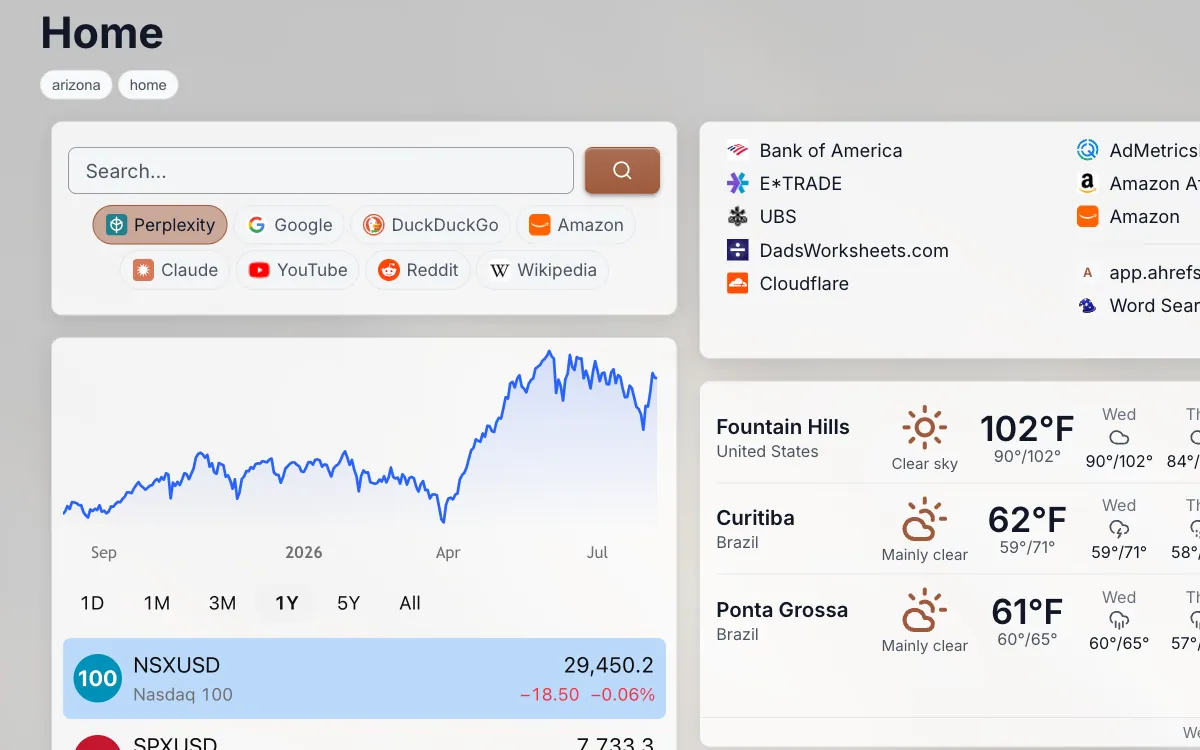
Watch what you actually type into a search box for a week. You append "reddit" to anything where you want a human opinion. You open a new tab and go to Amazon before you search for a product, because the general web results are affiliate roundups. You go straight to Wikipedia when you want a date or a definition without a listicle wrapped around it. You are already routing your searches by hand, one destination at a time, and paying a tab-and-a-half for each one.
The routing instinct is right. The mechanics are the problem.
Different questions live in different indexes
A general web search engine crawls everything and ranks it by signals that work well for informational queries and badly for everything else. A site's own search is looking at a much smaller pile with far better structure. Amazon knows which of its results are in stock, Prime-eligible, and rated 4.3 by 11,000 people. Google is guessing at that from the outside.
The mapping is not complicated, and most people already know it intuitively:
- Buying something, or checking what a thing costs: Amazon. The filters and the review count are the answer, not the blue links about the thing.
- A fact, a date, a definition, a person: Wikipedia. One page, no preamble, sources at the bottom.
- Is this product any good, did anyone else hit this problem, what do people who own one say: Reddit. Threads with disagreement in them beat a review site with an affiliate link.
- How do I physically do this: YouTube. Someone did it on camera with their hands.
- Code, errors, and library behavior: GitHub for the source and issue tracker, Stack Overflow for the error string.
- A question that needs several sources pulled together into an answer: Perplexity, ChatGPT, or Claude. Good for synthesis, worth checking when the answer needs to be right.
- Everything that does not fit a category above: Google, Bing, or DuckDuckGo.
Choosing the destination before you type gets you a better result in fewer steps than typing into the general box and refining twice. The cost of choosing has to be near zero, though, or nobody keeps doing it.
The two existing fixes, and where they leak
DuckDuckGo's !bang shortcuts are the best-known answer. Type !a headphones and you land on Amazon's results. There are thousands of them, they cover niche sites, and they respect your region setting. Two catches. You have to be searching from DuckDuckGo for a bang to fire, which means DuckDuckGo has to be your default engine everywhere. And you have to know the bang exists before you can type it. There is no moment in normal use where the browser tells you !so is a thing.
The other fix is Chrome's site search shortcuts, where you register a keyword and a URL pattern with a %s placeholder in it, then type the keyword and Tab in the address bar. This works well and almost nobody uses it, for a reason that has nothing to do with the feature: it is invisible. The shortcuts live in a settings page you visited once. They are per-browser and per-profile, so your work machine doesn't have them, and neither does your phone. Six months later you remember that you set one up for the docs site but not what you called it.
Both fixes are memory tests. You can only use the shortcut if you already remember the shortcut.
That is the actual failure. Not power, not coverage. Recall.
Put the destinations on the page
Linkamatic's search widget solves the recall problem by not requiring any. The engines you use sit in a visible row under the input, each with its own favicon. You click the one you want and type. Nothing to remember, nothing hidden behind a menu.
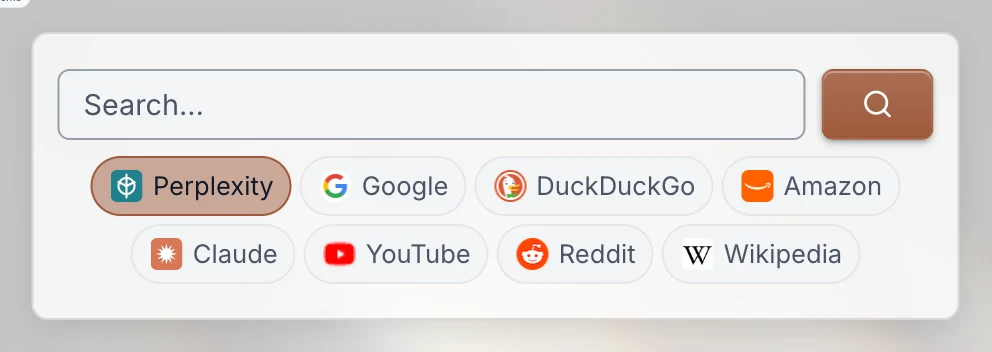
The catalog is thirteen engines: Google, Bing, DuckDuckGo, YouTube, Wikipedia, Amazon, Google Maps, GitHub, Reddit, and Stack Overflow on the web side, plus Perplexity, ChatGPT, and Claude on the AI side. Pick the ones you use and leave the rest off. Whichever engine you click stays selected for the next search, so if you fall into a run of Amazon queries you are not reselecting it every time.
The widget adapts to how much room you give it. Wide and tall, you get the wrapping pill row above. Short, and the pills collapse to icons beside the input. Narrow, and they become a compact dropdown that still shows which engine is live. It never grows an internal scrollbar and it never hides the active engine from you.
Nothing about this touches a server. The widget builds the destination URL in your browser and sends you there, which means no API keys, no proxy, and no record of your queries on our side. There is no search history stored anywhere, including locally.
Bangs, but you can see them
Clicking is fine when your hand is already on the mouse. When you are typing, bangs are faster, so the widget supports them too. Type "!r nikon z6 vs a7iii" and that one search goes to Reddit while your selected engine stays where it was. The prefix is stripped before the query is sent.
The difference from every other bang implementation is what happens the moment you type the exclamation mark. A popover opens listing the engines you enabled, each with its bang code and name, filtered as you keep typing. Arrow keys move, Enter or Tab picks, Escape closes and leaves your text alone.
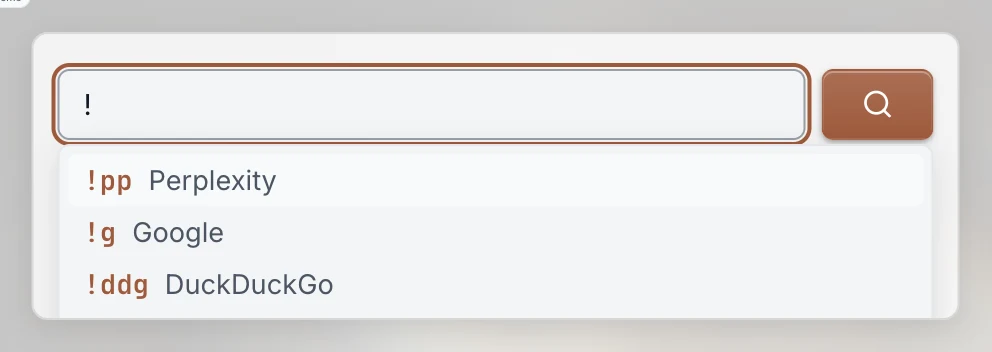
You learn the bangs by using the widget, which is the only way anyone learns a shortcut. If you type one that matches nothing enabled, the widget strips it and searches your selected engine for the rest of the text instead of dumping you on an error. If you find bangs annoying, there is a toggle to turn them off, and the exclamation mark goes back to being an ordinary character.
Set the default to whatever you reach for most
The default engine is the one thing worth spending thirty seconds on. It decides what is selected when the page loads, which is what you get when you type and hit Enter without looking. It also sits first in the pill row, so your most-used destination is the leftmost target.
Most people leave it on Google out of habit. The screenshots above come from a page whose owner set Perplexity as the default, because his first move on an unfamiliar question is to ask for a synthesized answer, and Google is one click away when he wants links instead. Someone who shops a lot should default to Amazon. Someone who reads more than they buy should default to Wikipedia or Reddit. The right answer is whatever you would have typed anyway.
In the widget settings you get:
- Engine checkboxes, split into Web and AI sections. At least one has to stay on.
- A default engine picker, limited to engines you actually enabled. Turn off the engine that was your default and it reassigns itself rather than saving something broken.
- A bang shortcuts toggle, on by default.
- An open-in-new-tab toggle, on by default, so your page survives the search.
- A placeholder string, an optional title, and background, text, and accent colors if you want the widget to match the rest of your page instead of the theme.
Four to six engines is the number that works. Enable all thirteen and the row becomes a wall of icons you scan instead of a set you know by position. Enable one general engine, one shopping, one reference, one community, and one AI, and your hand learns where each pill is within a week.
Why this belongs on a start page and not in the address bar
The address bar is a single-destination tool by design. It can hold shortcuts, but only one of them can be the default and none of them can be seen. A start page has room to show you the whole set at once, which is what turns a feature you configured into a habit you have.
Every Linkamatic home page gets a search widget in the top-left corner when the page is created, ahead of everything else, at a size that fits the full pill row. It is the first thing on the page because it is the thing you use first. If you point your browser at that page, you get the choice of destination before you type instead of after you are disappointed by the results.
The rest of the page is yours: links, bookmarks, weather, a calendar, RSS feeds, whatever you keep opening tabs for. The search widget just makes sure the box at the top asks a question the internet is set up to answer.