
The link your team needs most is usually the hardest one to find. It's three replies deep in a Slack thread from last Tuesday, or pinned to a channel nobody scrolls back through, or sitting in a Google Doc full of other links, half of which now 404. Someone asks where the staging URL is. Someone else pastes a version that's two deploys stale. A new hire DMs the manager because the onboarding checklist exists, technically, but no one can say where.
The fix isn't a better pin or a smarter search filter. It's one page the whole group opens, where the current links live and stay current. Not a doc about the links. The links themselves, in one place, that everyone treats as the source of truth.
Why chat is the wrong home for links
Slack and Teams are good at conversation and bad at memory. A link you drop in a busy channel is buried within hours, and the tools meant to rescue it (pin a message, save to Later, build a custom section) are workarounds that prove the point. Once you're maintaining a system of pins and saved items just to relocate a URL you posted last week, you've outgrown chat as your reference layer. Pins don't scale either. There's a hard cap on how many a channel holds, and well below it, a wall of fifteen pinned messages is its own kind of buried.
The cost is measurable. Lucid found team misalignment climbed from 37% to 44% between 2023 and 2024, and nearly 40% of workers say they don't know where to go to access all their project resources. A third of teams blame having too many tools for that confusion. When the answer to "where's the X" depends on who you ask and what they remember, the team isn't aligned, by definition.
A shared page answers "which link is current?" by having exactly one. You change it in one spot, and everyone sees the change the next time they look. No version forks, no re-pasting, no "are you sure that's the right one."
What actually belongs on it
Most advice on this lands on a sensible list, and it's worth stealing. A team start page should carry a short "start here" path for anyone new, a who's-who with roles and contacts, the handful of links everyone touches daily, the active project links, and a note on recent decisions so people stop relitigating settled questions. Coda and Lucid both converge on roughly this set, and it works.
What those lists miss is that a start page doesn't have to be a wall of links. It can hold live tools sitting right next to the bookmarks, and that changes what the page is for. A distributed group can put a multi-timezone clock at the top so nobody does the "wait, what time is it in Lisbon" math before a call. A team shipping something can pin a countdown to the launch date that everyone watches tick down. Drop in a month calendar, an RSS feed of the industry news the team tracks, a notes block for the current sprint's context, a weather widget for the city hosting the offsite. Now the page isn't just where links go to be found. It's something people want open.
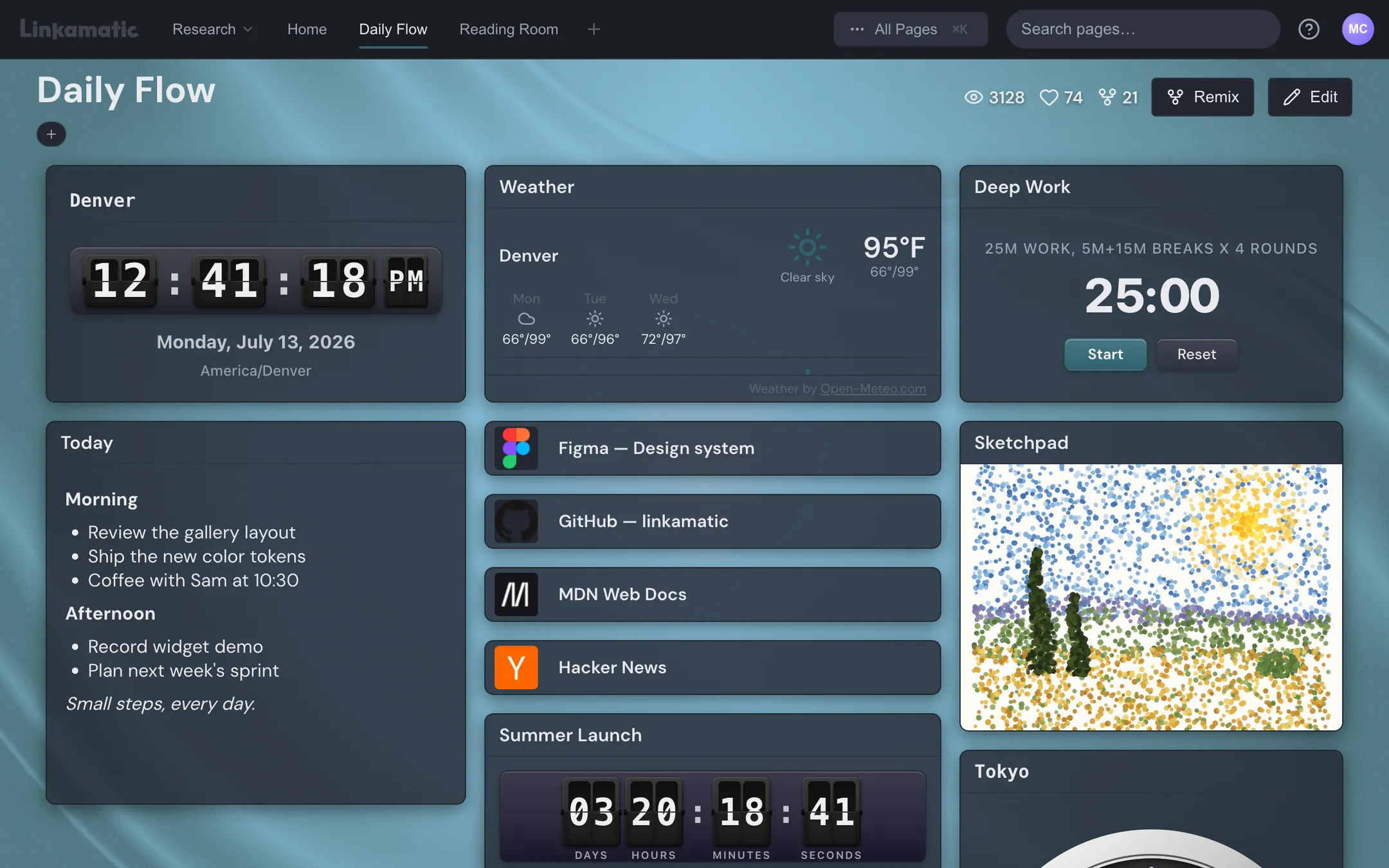
Linkamatic is built around that combination. You arrange links and widgets on a drag-and-drop grid, so one shared page carries the launch countdown, the timezone clock, the calendar, the news feed, and the bookmarks on a single screen. The mix of static links and living widgets is the part a spreadsheet of URLs can't touch.
Make it the page everyone opens
Here's the move almost nobody mentions, and it's the one that makes alignment automatic instead of aspirational. Set the shared page as the browser home and new-tab page for the whole group. Then nobody has to remember to visit it. They open their browser in the morning and it's there. They hit Cmd-T and it's there. The shared context becomes the thing they literally can't avoid, which is a much lower bar than "please bookmark this and check it daily."
A page everyone has bookmarked is a reference. A page everyone opens by default is alignment.
A bookmarked page is a reference some people remember to check. A page that loads on every new tab is shared reality. The difference shows up in week three, when the reference page has gone stale and the home page is still the first thing forty people see each day, so it gets fixed.
Setting one up without standing up an intranet
The enterprise version of this is a SharePoint or Confluence project with an IT rollout, content owners, and a launch plan. A small group, a study cohort, a club, a five-person startup, needs none of that and shouldn't pretend to. The low bar is the whole appeal.
In Linkamatic that's: make a page, drop your links and widgets onto the grid in edit mode, drag them where you want, then exit edit mode to use it. Invite collaborators with full edit access so anyone can fix a dead link, or hand out the page's plain public URL (it looks like linkamatic.com/p/yourname/pagename) by pasting it into the channel topic or an email. Accounts are free, sign-in is email or Google, and there's nothing to provision. That URL always shows the current state, which is the point.
Keep it from rotting
Every shared space decays if nobody tends it, and "assign an owner" is true but thin. Concretely:
- Group related links into containers or sections so the page reads as a few labeled clusters, not one long scroll.
- When a page gets crowded, split it: one page per project, kept in a folder, with the active one favourited so it's a single click away.
- Name one person the informal housekeeper. Their whole job is a monthly pass to archive dead links and prune what no one uses.
- Treat the recent-decisions note as append-and-trim, not a growing log nobody reads.
None of that needs a governance committee. It needs one person spending ten minutes a month, which is the realistic version of "content ownership" for a group of five or fifty.
Turn your best page into a template
Once you've built a page that works, make it public and let the next group remix it, copying it into their own account in one click. A new cohort, the next project team, the spring semester's study group, each gets a working setup instead of a blank screen. Your best onboarding page becomes the default starting point for everyone who comes after, which is the cheapest scaling you'll ever do.
You can build this with tools you already have, badly, in a doc. Building it well takes a surface that holds both links and live widgets on one shared, set-as-home link. Linkamatic is one free way to do that.