
Most people's bookmarks die the same way. You save a link, then another, then a few hundred more, and within a year you're only clicking the eight that live on your bookmarks bar. The rest sit in a folder you never open. A writer at XDA described hers as spanning years with no organization, and she'd given up on all of it except the bar. Native bookmarks don't fail because they run out of room. They fail because saved links go invisible, and an invisible link might as well not exist.
Three tools claim to fix this: a dedicated bookmark manager, a new-tab extension, and a start page. They sound interchangeable. They aren't, and the differences decide which one you'll still be using six months from now.
What each one actually is
A bookmark manager (Raindrop.io, Linkwarden, Karakeep) is organize-first. You file links into collections, add tags, sometimes highlight or annotate the pages you save. Raindrop's free tier gives you unlimited bookmarks, collections, highlights, 2,600-plus integrations, and 100MB of uploads a month; reminders, annotations, and daily backups sit behind the paid plan. It's good at keeping a large library tidy. It's not a dashboard. You won't get a clock, the weather, or a notepad out of it, and the XDA writer said as much, calling Raindrop not very customizable with no widget support.
A new-tab extension replaces the page you see whenever you open a tab. Some are decorative (Momentum, Tabliss) and mostly give you a wallpaper and a greeting. Others are widget dashboards (Start.me, Anori) that pack in panels and clocks. What they share is how they run: an extension is installed code with browser-level permissions, and a new-tab extension executes on every single tab you open.
A start page is just a website. You point your browser's home and new-tab settings at a URL, and that page loads instead of the default. No install. It has no special access to your other tabs, your history, or your cookies, because it's a page like any other page. That one architectural fact, which almost none of the comparison articles state plainly, decides most of the trade-offs below.
The comparison that matters
The field already agrees on the criteria for judging a new-tab tool: speed (Linkflare argues more than half a second to load feels broken), how customizable it is, whether it works across browsers, and privacy. Add two the usual roundups underweight: portability and lock-in.
All three can be fast, though Start.me is known to drag with many widgets active, and an extension running heavy JavaScript on every tab taxes you constantly. Bookmark managers organize but don't decorate; decorative new-tab tools decorate but don't organize; widget dashboards and start pages can do both, with varying effort. Cost is where you should read the fine print. Momentum hides most of its features behind Plus. Some free extensions were caught collecting more data than they needed and selling browsing data to third parties, which is how a free extension pays its bills.
Portability is the column people forget until it bites them. Folder-based bookmarks live inside one browser's sync. Infinity and Home are Chrome-only. Tabliss is open-source and free but hasn't shipped an update since April 2022. When your tool is tied to one browser or quietly abandoned, your setup goes with it. A start page reachable at a stable URL doesn't care what browser you open it in. It loads on your phone, a borrowed laptop, or a second browser with no sync to configure.
The permission problem nobody chose on purpose
Here's where new-tab extensions get genuinely risky, and it's worth being precise instead of alarmist. When an extension asks to read and change all your data on the websites you visit, that's often just core functionality. A tab manager needs to see tabs. The scary string isn't proof of malice. The problem is what those permissions could do, and who's holding them.
Run through what's exposed. The all-urls permission lets code observe and inject on every site. The webRequest permission logs full URLs including query parameters. The cookies permission can read session identifiers. The history permission is a complete log of where you've been. The tabs permission reveals the titles, favicons, and URLs of everything you have open. A new-tab extension is the worst place to grant these, because it sits on the highest-frequency surface in the browser. Several extensions with overlapping permissions can correlate timestamps and referrers to reconstruct your journeys across sites, then keep profiles that survive restarts.
The part you can't manage is ownership. The Great Suspender was a trusted, widely installed extension until its maintainer handed it to a new owner who shipped tracking and unwanted command code; Google eventually pulled it. The users who'd vetted it years earlier did nothing wrong. The extension they trusted got sold and weaponized over their heads. Permissions can also be added silently in an update, and the awareness gap is real: across a Chrome Web Store with 180,000-plus extensions and 1.5 billion installs, fewer than one in five users could correctly explain what all-urls permits.
The cleanest fix for extension permissions is choosing a tool that needs no install permissions at all.
You can vet an extension, and you should: real developer site, a privacy policy, recent reviews, open-source code, and watch for new permissions after updates. But the move the privacy guides skip is simpler. If the dashboard is a web page instead of installed software, there's no permission prompt to read, no background script to audit, and no future owner who can turn it against you.
When a bookmark manager is overkill
Plenty of people don't need a new tool at all. Tiago Forte's PARA method runs entirely on native bookmarks: Projects for active deadline-bound work, Areas for ongoing responsibilities with no end date, Resources for things you're learning or reusing, Archives for everything inactive. Move finished projects to Archive instead of deleting, keep no empty folders, pin favicon-only shortcuts for your daily sites, and lean on bookmark search once the pile grows. It's a real system that costs nothing.
PARA fixes structure and only structure. Your links stay device-local, stay tied to one browser's sync, and still show no preview of what's behind them. A dedicated manager earns its place when you save heavily, do research, or want highlights and annotations on the pages themselves. If you mostly revisit the same forty sites and want to see them, a manager is more machinery than the job needs.
Replacing tabs, not just storing links
The underrated argument for a start page is subtraction. If your home page shows the weather, runs a Pomodoro timer, holds a notepad, reads your RSS feeds, and does quick math, that's five single-purpose tabs or extensions you no longer open. Fewer installed extensions is itself a privacy win, because every one you remove is a permission set you no longer have to trust.
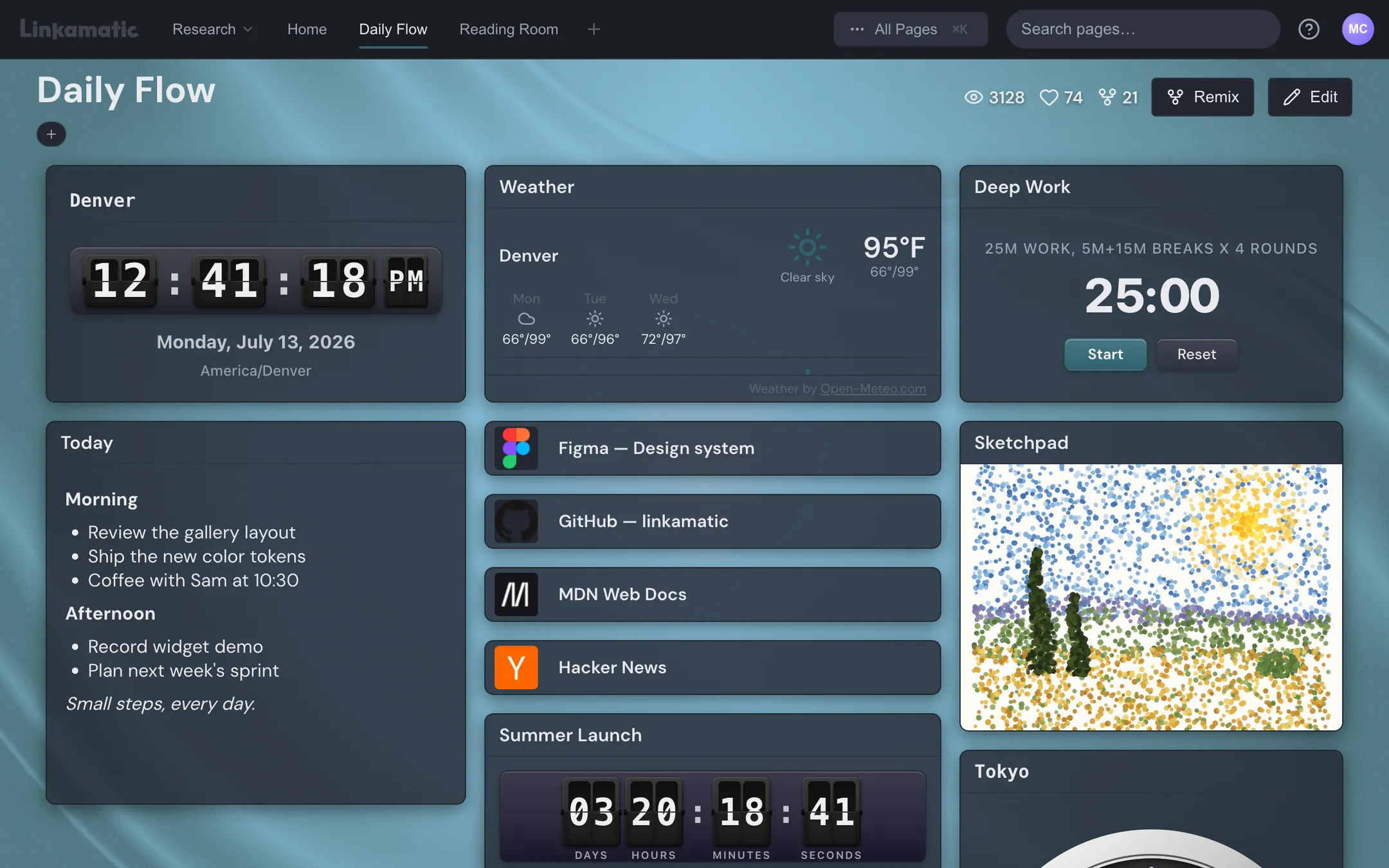
This is the gap the XDA writer ran into: a bookmark manager organized her links but couldn't be a dashboard. Linkamatic lives on that line. You drag links and small widgets (clock, weather, calendar, countdown, focus timer, Markdown notes, RSS reader, watchlist, search box, calculator, and more) onto a grid, then set it as your home and new-tab page by pasting a URL. No install, no permission prompt, because it's a page, not an extension. It organizes links in folders and favorites, gives you the widgets, and every page has a stable public URL like linkamatic.com/p/yourname/page that opens from any device. Make a page public and a team or class can use it, or remix it into their own account in a click, which is the sharing case bookmarks and extensions both handle badly.
The questions that pick the winner
Forget feature counts. More widgets don't make a better page; a focused one beats a cluttered one. Ask these instead:
- Does it need to be installed? If yes, you're taking on permissions and a future owner you don't control.
- Will my setup survive switching browsers or the tool being abandoned, or is it locked to one codebase?
- Can I see my links without digging, or will they go invisible again the way the bookmark bar did?
- Do I need to share a page with anyone, or is this strictly solo?
- What's actually free, and if it's free, how does the maker get paid?
If your answers point toward a visible dashboard you don't have to install, that survives a browser switch, and that you can hand to someone else, a start page is the shape that fits. Building one at Linkamatic is free, no extension required.