
You saved it. You're sure you saved it. Some article about React Server Components, or a supplier's pricing page, or the one Stack Overflow answer that actually fixed the thing. Now it's gone, somewhere inside a few hundred bookmarks you haven't opened since the day you made them. So you do what everyone does: you Google it again. The second search takes longer than the first, because last time you had the exact phrase fresh in your head and now you're guessing.
That's not a memory problem. It's the bookmark itself. The thing was designed in the mid-90s as a flat list of maybe a dozen favourite sites, the digital version of a handful of dog-eared pages. Then we bolted folders onto it and asked it to be a personal archive of the entire web. It was never built for that, and it shows.
Three ways the bookmark fails you
Start with rot, which is mostly just abandonment. Your list grows. It gets ugly. You stop trusting that anything's findable in there, so you stop adding to it, and once you've stopped adding you've stopped using it, and now it's a graveyard you scroll past on the way to the address bar. Nobody decides to abandon their bookmarks. The list just quietly becomes write-only.
Then there's tab hoarding, which is what you do instead of bookmarking. There's a good thread on Hacker News where someone calls tab hoarding "directly connected to exceedingly poor bookmark UX/UI in browsers," and they're right. Bookmarking is high-friction, and worse, a bookmark only saves a URL. The tab you're hoarding holds state: you're logged in, the form's half-filled, the feed has scrolled to where you were. A bookmark throws all of that away, so you keep the tab. Forty tabs deep, finding the one you want costs more than just opening a new one, so you re-fetch instead of re-finding, and the count climbs.
The third is the folder itself. Deep nesting hides things, and the deeper killer is that any link worth saving fits two or three categories at once. Is that article about a website redesign filed under Design, under Work, or under that specific client? It belongs in all three and lives in none, so you guess wrong every time you go looking. The same poster on that thread put it better than any product page could: "if I don't see something, I forget it exists." Anything that isn't on the visible bookmarks bar is, functionally, gone. An XDA writer who tried to fix his own mess found exactly this: nearly everything he'd ever saved went unused except the few links sitting on the bar where he could see them.
Out of sight isn't a metaphor here. It's the whole failure.
"Just search for it again" has a bill
Re-finding feels free because each instance is small. It isn't free. There's a number that gets passed around, originally from a University of California study, that a single interruption costs around 20 minutes to recover from. Take that one with a grain of salt, it's been stretched pretty far in marketing copy, but you don't need the exact figure to feel the shape of it. Re-Googling a link you already found, three or four times a week, every week, adds up to real hours you'll never itemise.
The quieter cost is context. When you first saved that link, you knew why it mattered. It was the answer to a specific question, the third option you were comparing, the thing your colleague swore by. A bookmark stores the URL and discards the reasoning. So even on the lucky day you do find it again, you've lost the why, and you have to re-decide from scratch whether it's still worth anything. You're not just re-finding the link, you're re-earning the judgement you already made.
What actually works: make the few links you use visible
Most of the advice in this genre says move your links into yet another app, Raindrop or Pocket or Pinboard or whatever, and search it better. Which is a little funny, because the diagnosed problem was that your links are scattered across too many places (bookmarks, a notes app, a message you sent yourself, three open tabs), and the prescribed cure is to add one more place that lives behind one more tab you have to remember to open. Better search inside a silo you never visit doesn't help.
You don't have a search problem, you have a visibility problem. You don't need a catalogue of every link you've ever touched. You need the ten or fifteen links your day actually runs on, sitting somewhere you'll see them every single time you open your browser, in a fixed spot you can hit by muscle memory. Docs always top-left. Calendar always next to it. After a week your hand goes there without your brain involved, which is the whole point, because the brain was the thing forgetting.
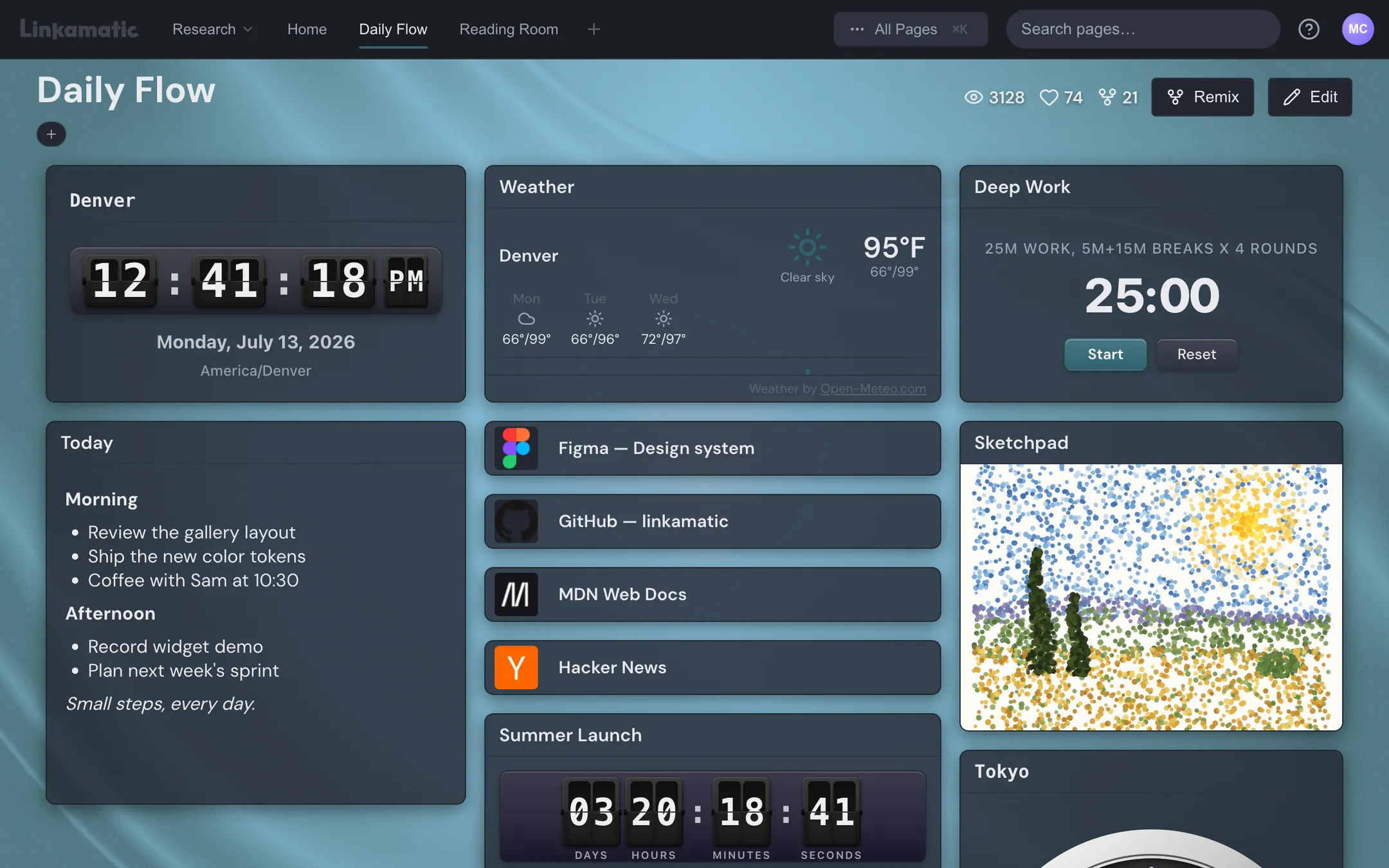
Tiago Forte's PARA method gets the principle right even though it stops at folders: organise by whether something is actionable, not by what topic it's about. Topics don't tell you if a link still matters; actionability does. A layout takes that further than any folder list can. Your daily drivers go big and centred. The long tail goes smaller, or onto a second page. Position becomes priority, which a flat list can never express.
This fixes the tab hoarding too, because the tabs you keep open usually aren't links at all, they're tools. A feed you're watching. A weather page. A stock ticker. A timer. If those live on the page as small live widgets sitting right next to your links, there's no tab left to hoard. The thing inside it now has a home.
That's roughly what Linkamatic is, if you want one concrete version of the idea: a start page you build yourself by dragging links and small widgets (clock, weather, RSS, notes, a watchlist, a search box) onto a grid, then setting it as your browser's home and new-tab page so it loads every session. It's free, email or Google sign-in. One way to do it, not the only way, and the plan below works no matter what you use.
A do-it-today migration
- Export your bookmarks to an HTML file (every browser does this from the bookmark manager).
- Sweep the whole pile into one folder called Archive. Don't hand-sort it. PARA's right that most of it is dead weight, and rescuing one link on demand later is cheaper than triaging hundreds now.
- Open your history and list the links you actually opened this month. There will be about ten. That's your real working set.
- Place those ten where you'll see them, biggest and most central for the ones you hit daily. Name them so they're searchable later: "React server components migration guide," not "interesting thread." Five seconds at save time.
- Set that page as your browser's home and new-tab page so it opens itself, no extra app to remember.
- Find your two most chronically-open tabs and replace them with a widget, a feed reader, a watchlist, the weather, whatever they were.
- Once a month, spend ten minutes deleting anything you haven't touched in three. Curate, don't accumulate.
You'll end up saving more links, not fewer, the same thing the XDA writer found once his links were finally visible. A surface you can see invites use. A buried one invites abandonment.
Stop trying to archive the web. You were never going to read most of it twice. Curate the handful of links your actual day depends on, put them where your eyes already land, and let the rest sit in the Archive where it can't slow you down. Findability was never a storage problem. It's a layout problem.