Linkamatic lets you open and browse public pages that other people have built and shared. If you come across a public page that breaks the rules, you can report it so the Linkamatic team can take a look. This guide explains when reporting a page makes sense, how the report form works, and what happens after you submit a report.
When reporting is appropriate
Reporting is for public pages — the kind anyone can open from a shared link. Report a page when its content breaks the rules, not because you dislike how it looks or disagree with what it says. The specific reasons you can choose from are listed further down.
To report a page, you need to be logged in, and it has to be someone else's page. The report option doesn't appear on your own pages, or on a page you help edit as a collaborator — the people who can edit a page can't report it.
How to report a page
The report option lives in the header of a public page while you're viewing it. It's a small flag button, and hovering over it shows the label Report this page.
- Open the public page you want to report.
- Click the flag button in the page header.
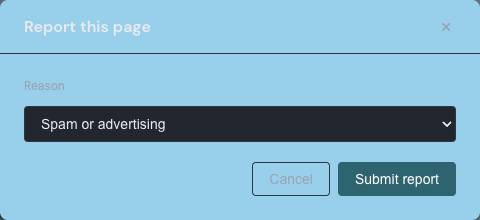
- In the dialog that opens, choose a reason from the Reason menu.
- If you choose Other, describe the issue in the Details field that appears.
- Click Submit report.
Choosing a reason
The form asks you to pick the one reason that best fits what you're seeing. Your choices are:
- Spam or advertising
- Misinformation
- Harmful or dangerous content
- Illegal content
- Harassment or abuse
- Copyright violation
- Other
When you choose Other, a Details field appears and a short explanation is required so the team knows what to look at. The other reasons don't show an extra text box — the reason on its own is enough.
What happens after you submit
After you submit, Linkamatic confirms it received your report and thanks you. From there, the Linkamatic team reviews reported pages by hand. A report doesn't hide or flag a page on its own, and a page isn't taken down merely because it has been reported — a person reviews each report and decides what, if anything, to do.
You can report any given page once. After you report it, the report option disappears for that page, so you can't send a second report for the same page. If you try anyway, Linkamatic lets you know you've already reported it.
Notices for page owners
Moderation can reach you as a page owner, too. If the Linkamatic team acts on one of your pages after a content report, a notice appears the next time you log in. It shows up as a banner near the top of the screen, and you can dismiss it once you've read it.
The notice tells you what happened — for example, that your page was made private following a content report, or that a page was removed following a content report. Linkamatic delivers this inside the app only; it doesn't send an email about moderation actions.
Good to know
What if the page is private?
You can report only public pages, so the report option appears on pages you can open at a shared link. If a page is private, you won't see the option. For anything reporting doesn't cover, you can reach out through contact support.
Will the page owner know it was me?
The moderation notice a page owner might see mentions only that action was taken following a content report. It doesn't name who reported the page.