The Habits widget helps you build routines and watch your streaks grow. Keep a short list of the things you want to do — drink water, read, stretch, practice a language — and tap one each day to mark it done. The widget tracks your current and best streak for each habit, forgives the days you schedule off, and can show your history as a row of recent dots or a full-year heatmap. Because logging happens right on the page, checking a habit off takes a single click.
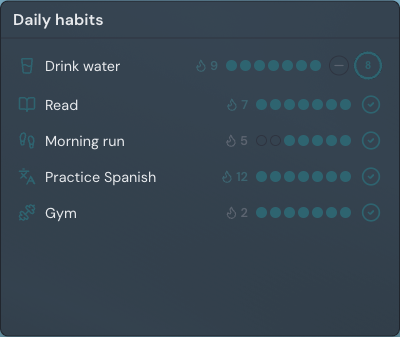
Adding the Habits widget
- Open the page you want to add it to and click Edit in the page header.
- Click Add Widget.
- Choose Habits from the picker, under the General category.
- Add your first habit, pick how it should repeat, and save — you can change everything later.
Settings
Open a widget's settings from the gear on its edit-mode toolbar. The drawer holds these options:
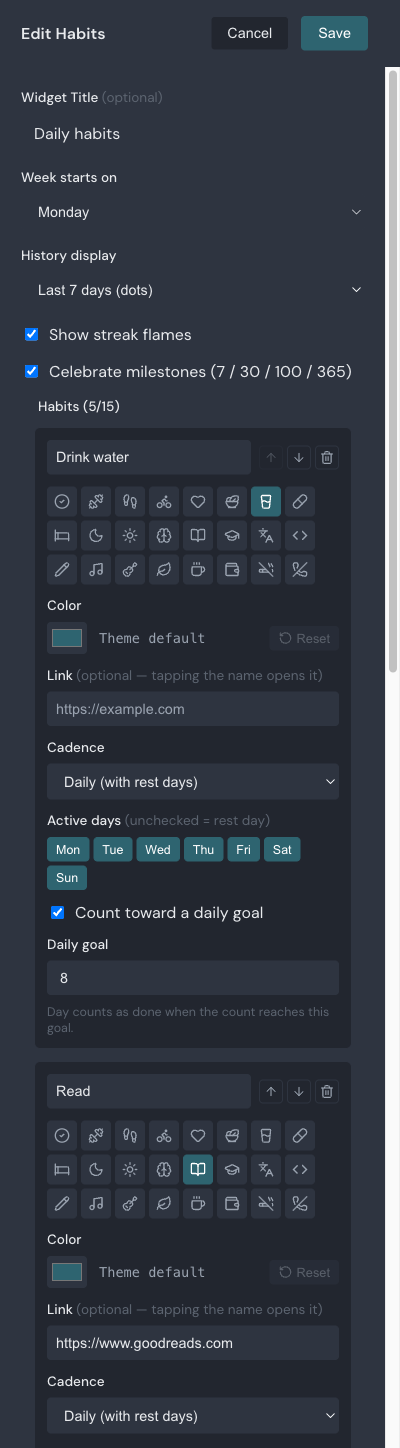
| Setting | What it does |
|---|---|
| Title | Optional heading shown above the habits. Leave it empty for no header; up to 80 characters. |
| Week starts on | Sets whether weeks begin on Monday or Sunday, which affects weekly targets and the heatmap columns. |
| History display | Chooses how past days appear: the last seven days as dots, a full-year heatmap you expand per habit, or nothing. |
| Show streak flames | Shows or hides the flame and streak number next to each habit. |
| Celebrate milestones | Turns the little celebration on or off when a streak reaches 7, 30, 100, or 365. |
| Habits | The list you build, one card per habit. Each card sets the habit's name, icon, color, and an optional link. |
| Cadence | Sets whether a habit repeats daily (with rest days) or aims for a weekly target. |
| Active days | For daily habits, the days it is expected. Unchecked days are rest days that never break a streak. |
| Daily goal | For daily habits, an optional count to reach each day — like eight glasses of water — shown as a progress ring. |
| Times per week | For weekly habits, how many different days each week count toward the target. |
Checking off a habit
Tap the round control at the end of a habit's row to mark today done; tap it again to undo. For a habit with a daily goal, the control is a progress ring instead — tap it to add one toward the goal, and use the small minus button to take one back. The day counts as done once the ring is full. Your history saves automatically, so it is there when you come back or open the page on another device.
You can log habits while simply viewing your page — you do not need to enter edit mode. On a page you have shared, only you and your collaborators can check things off; everyone else sees the habits and streaks but the controls stay inactive.
Filling in missed days
Forgot to mark something yesterday? In the last-seven-days dot strip, tap any of the recent dots to fill that day in. For a habit with a daily goal, tapping a past dot opens a small stepper so you can set that day's count. You can edit the last seven days this way; older days stay as they are.
How streaks work
A streak counts the run of days (or weeks) you have kept a habit going, ending today. Today stays "pending" until you check it off, so an unfinished today never breaks your streak — it just has not extended it yet. Your best streak is remembered separately, so it never drops even after old history ages out.
- Rest days are free: a day you leave unchecked in a habit's schedule is skipped, not counted as a miss.
- Weekly habits count a week as done once you reach the target number of different days, and the streak counts consecutive successful weeks.
- Habits with a daily goal only count a day once the count reaches the goal — a partial day keeps today pending.
Turning a habit into a link
Give a habit a link and its name becomes clickable, opening that page in a new tab while the check control still logs your progress. Point "Practice Spanish" at your language app or "Read" at your reading list, so the habit both reminds you and takes you straight there. Habits without a link show their name as plain text.
Habits pair well with the rest of your daily dashboard — keep them next to a Bookmarks widget of the sites you open every morning, or read more about working with widgets to arrange your page.