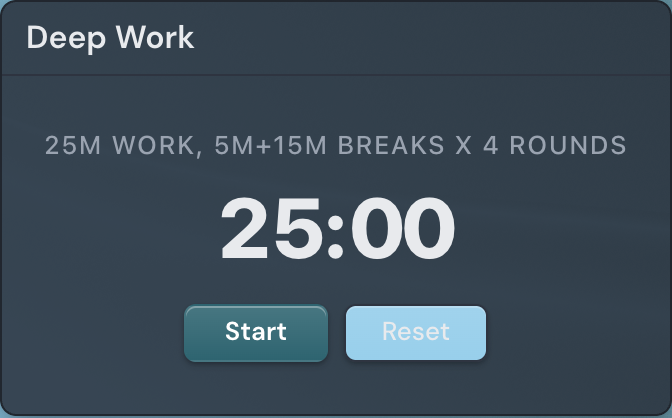
The Timer widget is a countdown work timer you can drop on any page. Set a duration and it counts down to zero, so you can time a task, a break, a pot of tea, or a meeting slot at a glance. Switch it to an interval mode and it chains repeating work-and-rest intervals for focus sessions — Tabata rounds or a Pomodoro study cycle — without leaving the page.
Adding the Timer widget
- Open the page you want to add it to and click Edit in the page header.
- Click Add Widget.
- Choose Timer from the picker.
- Pick a mode, set the duration or intervals you want, and save (you can change them anytime).
Settings
In edit mode, open the widget settings drawer with the gear on the widget toolbar to reach these options.
| Setting | What it does |
|---|---|
| Title | Adds a small header above the timer naming it. Leave it blank for a plain timer with no header. |
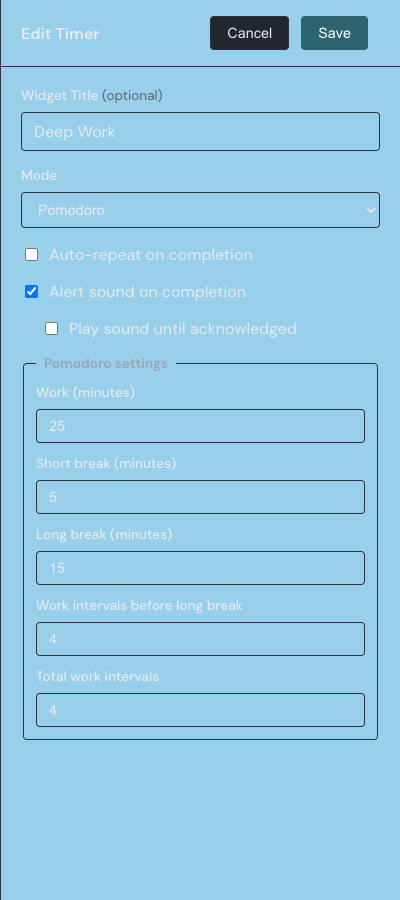
| Mode | Sets how the timer runs: Simple, Tabata, or Pomodoro. The drawer shows only the fields that apply to the mode you pick. |
| Duration | The countdown length for Simple mode, entered as separate Days, Hours, Minutes, and Seconds fields. It can be anything from 1 second up to 30 days. |
| Auto-repeat on completion | Restarts the timer automatically when it reaches zero instead of stopping. In Tabata or Pomodoro mode it restarts the whole sequence. |
| Alert sound on completion | Plays a short beep when the timer finishes. It is on by default. |
| Play sound until acknowledged | Keeps replaying the alert and shows a Done button when the timer finishes; the sound stops only when you click Done. This option appears only while the alert sound is on. |
| Tabata settings | Shown in Tabata mode. Work (seconds) and Rest (seconds) set the length of each interval, Prepare (seconds) is an optional lead-in before the first round where 0 skips it, and Rounds sets how many work-and-rest cycles run, up to 99. |
| Pomodoro settings | Shown in Pomodoro mode. Set Work, Short break, and Long break in minutes, choose how many Work intervals before long break, and set the Total work intervals in the run. It starts from the classic 25, 5, and 15 minutes, with a long break after every 4 work intervals. |
Choosing a mode
The Mode setting gives the timer three ways to run. Switching modes changes which fields the drawer shows.
- Simple — a single countdown from the Duration you set. It stops at zero unless Auto-repeat is on, and it is the default for a new timer.
- Tabata — alternating Work and Rest intervals repeated for a set number of rounds, with an optional Prepare countdown before the first one.
- Pomodoro — the classic productivity cycle: focused work intervals separated by short breaks, with a longer break after every few of them.
In Tabata and Pomodoro mode the widget shows which interval you are in and which round you are on. Each time it moves to the next interval it flashes a colored border for a moment, and plays the alert sound too when that is turned on, so you know a phase changed without watching the clock.
Starting, pausing, and resetting
The timer has two controls below the readout. The main button reads Start when the timer is idle; press it and it becomes Pause while the timer runs. Pausing changes it to Resume, which continues from where you left off. The Reset button returns the timer to the beginning — the full duration in Simple mode, or the first interval of the sequence in Tabata and Pomodoro.
These controls work while you are viewing the page. In edit mode they are disabled, so you can move and resize the widget without starting a countdown by accident.
When the timer finishes
When a Simple countdown reaches zero, or an interval sequence finishes its final round, the timer stops and plays a short beep if Alert sound on completion is on. If your browser blocks sound or does not support it, the widget pulses its border a few times instead, so you still get a visual signal.
With Play sound until acknowledged turned on, a finished timer keeps replaying the alert every few seconds and shows a single Done button; clicking Done silences it and returns the timer to the start. With Auto-repeat on, the timer never waits — it restarts on its own the moment it finishes.
The timer runs entirely in your browser and needs no setup beyond its options. To count down to a specific calendar date instead of a length of time, use the Countdown widget. For how to add, move, and resize any widget, see the widget basics guide.